
NEWS
The Windows 11 Dark Mode Update Made File Explorer Flash White
Optional Windows 11 update KB5070311 darkened File Explorer dialogs, then made the window flash white. Patch Tuesday closed that known issue eight days later.

Microsoft’s optional Windows 11 update KB5070311 promised a more consistent File Explorer dark mode, then listed a white flash as a known issue. The preview reached 24H2 and 25H2 on December 1, 2025, as builds 26100.7309 and 26200.7309.
People who clicked Download and install got darker copy and delete boxes, and a blank white window on everyday clicks. The December security package closed that item eight days later.
What KB5070311 Changed in File Explorer Dark Mode
Microsoft billed the preview as a polish pass, not a security patch. In the support notes it said File Explorer now offers a more consistent dark mode experience, and it pointed at the boxes you see when you copy, move, or delete files. Progress bars and chart views were supposed to follow the dark theme. Skip, override, and file-selection confirmations got the same treatment, along with several error dialogs.
File Explorer now offers a more consistent dark mode experience. Key actions such as copy, move, and delete dialogs have been updated in both default and expanded views. Progress bars and chart views now align with the dark theme to improve readability.
Microsoft, KB5070311 support document
Release Preview Insiders saw the same pitch in November, when the Windows Insider Program Team wrote that the copy, move, and delete dialogs had been updated in both default and expanded views. Those notes also logged a fix for an old white toolbar that could appear in File Explorer for no good reason. The dark-mode work was the headline. The white toolbar line sat in the same File Explorer block, as if leftover light chrome was the thing being retired.
Other Explorer bits rode along. Video files with certain EXIF metadata were supposed to show thumbnails again. The Open item on the right-click menu was supposed to show the real app icon instead of a generic one. A Recommended section on Home could be turned on in Folder Options. That is not why the preview blew up in dark rooms. The flash did that.
A Blank White Window on Open, Tabs, and Copy
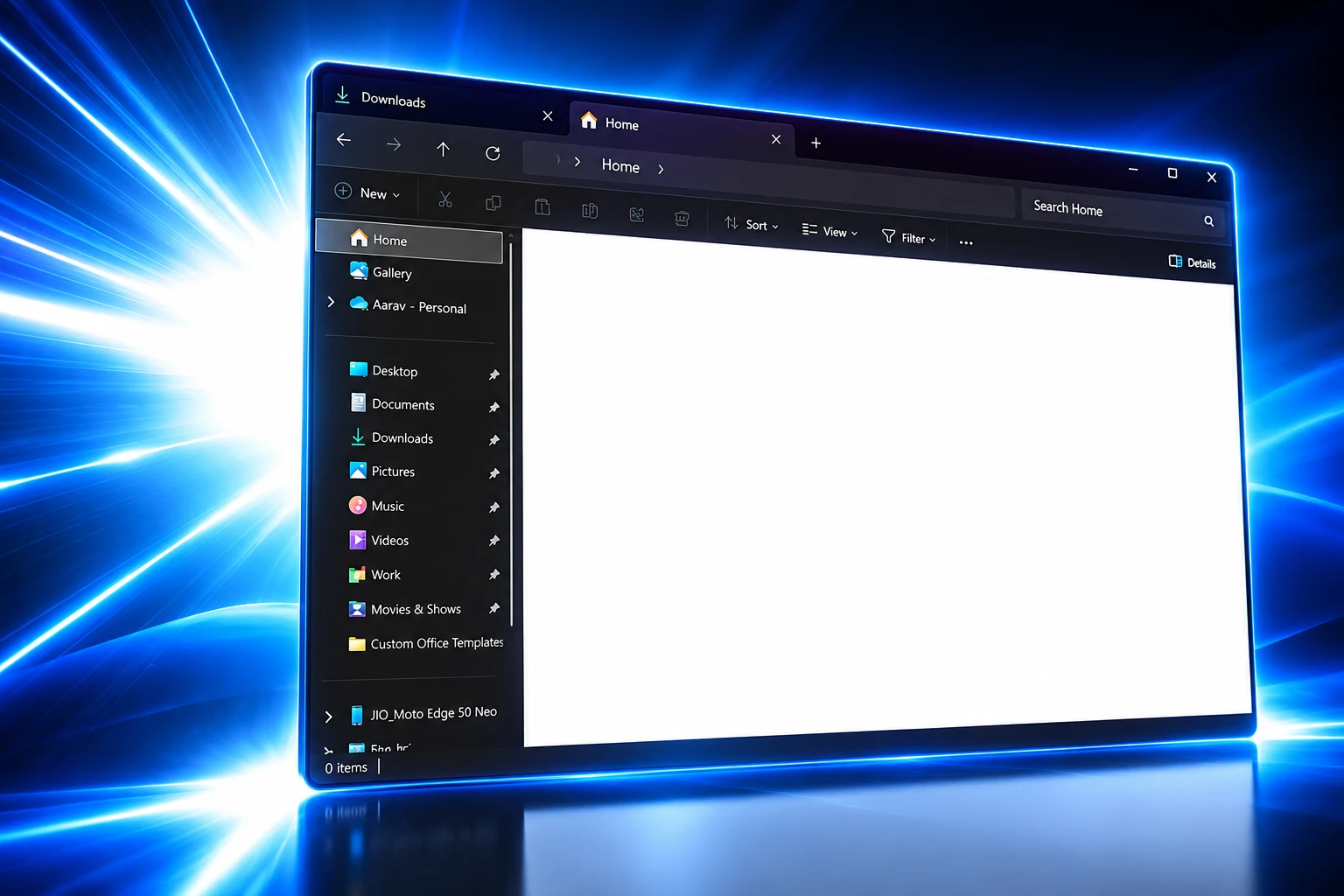
Microsoft wrote the failure down in the same KB, under known issues. After KB5070311, File Explorer in dark mode might briefly display a blank white screen before files and folders load. The burst is the whole pane going white, then the dark UI catching up. In a dim room it reads as a camera flash in the middle of the desktop, which is why people reached for “flash bang” the day the preview landed.
The company said the same white screen can show up on several ordinary moves, not only the first launch.
WHEN THE WHITE SCREEN SHOWS UP
- First open: Launching File Explorer in dark mode can paint a blank white window before the folder list appears.
- Home and Gallery: Moving to or from Home or Gallery, including launching straight to Home, can trigger the same burst.
- New tabs: Creating a new tab can flash white before the tab contents draw.
- Details pane: Turning the Details pane on or off can flash the window again.
- Copy details: Choosing More details while files are copying can flash the operation UI.
Microsoft tied the bug to dark mode. Light mode did not get that known-issue write-up. There was no registry trick and no official “do this instead” on the first notes; the company said it was working on a fix, then later pointed the same item at the next monthly package.
The five triggers are not obscure corners of the shell. They are how you browse, tab, inspect, and copy. That is why a short paint bug felt bigger than a one-frame glitch on a settings page nobody opens.
Only Manual Installers Saw the First Wave
KB5070311 was one of Microsoft’s optional non-security preview updates. It did not install itself on a typical PC. You had to open Windows Update and choose Download and install, or turn on the switch that grabs optional updates early. Release Preview Insiders had already been on the train: builds 26100.7296 and 26200.7296 shipped on November 17, 2025, and a small refresh on November 26, 2025, moved those branches to 26100.7309 and 26200.7309, the same numbers the public preview used.
Windows 11 version 24H2 took build 26100.7309. Version 25H2 took 26200.7309. The KB number was shared. The two build prefixes mark the two servicing branches, not two different feature packs.
THE TWO PACKAGES THAT MATTER
| Update | Date | Builds | What it did |
|---|---|---|---|
| KB5070311 | December 1, 2025 | 26100.7309 (24H2), 26200.7309 (25H2) | Optional preview: darker Explorer dialogs, plus the dark-mode white flash |
| KB5072033 | December 9, 2025 | 26100.7462 (24H2), 26200.7462 (25H2) | Monthly security update: preview quality bits, plus the flash marked Fixed |
Early installers were the only people who lived with the unpatched flash on the stable 24H2 and 25H2 branches. Everyone who skipped optional previews still received the dark dialogs, because the December security package folded KB5070311’s quality changes into the mandatory train. They also received the flash fix in the same download. The people who opted in to see dark copy boxes first were the people who got flash-banged for a week.
The preview had other known issues on the same support page. After KB5070311, RemoteApp connections could fail in Azure Virtual Desktop, while full desktop sessions were left alone. That one sits in enterprise shops, not on a home laptop. The File Explorer flash was the bug you could see from the back of the room.
KB5072033 Closed That Known Issue on December 9
Patch Tuesday did not wait for January. KB5072033, dated December 9, 2025, is a cumulative security update for Windows 11 versions 24H2 and 25H2. Microsoft said it includes the latest security fixes and the non-security work from the optional preview. In the improvements list, File Explorer is called out as a known issue being closed.
The wording is narrow and useful. The update addresses an issue where File Explorer briefly flashes white when you navigate between pages, and it says that issue might occur after you install KB5070311. 24H2 moved to 26100.7462. 25H2 moved to 26200.7462. On the KB5070311 page, the known-issue block was updated to say the flash is addressed in KB5072033.
FROM RELEASE PREVIEW TO PATCH TUESDAY
- November 17, 2025: Release Preview gets KB5070311 as builds 26100.7296 and 26200.7296, including the darker Explorer dialogs.
- November 26, 2025: A small RP refresh lands builds 26100.7309 and 26200.7309 under the same KB.
- December 1, 2025: The optional preview opens to 24H2 and 25H2, and Microsoft lists the dark-mode white flash as a known issue.
- December 9, 2025: KB5072033 ships as the monthly security update and marks that File Explorer flash Fixed.
Microsoft’s Windows Update account put the same File Explorer line in its December 9 highlights, next to a Copilot click-to-do fix, which is as close as the company came to saying the flash out loud on social media.
Highlights for Windows 11, version 24H2 & 25H2:
•This update addresses security issues for your Windows operating system.
•This update addresses an issue where Ask Copilot didn’t activate the Click to Do window as expected. The window now appears in the foreground when you…— Windows Update (@WindowsUpdate) December 9, 2025
Eight days is fast for a visual bug that should have been obvious on any dark-mode test pass. It is also an admission that the optional preview shipped with a defect in the exact surface it was advertising. PCs that never offered the preview a click never had to wait on that known-issue paragraph. They jumped to 7462 and got the dark dialogs with the flash already crossed out.
Microsoft Was Still Writing About Explorer Flashes in August
Closing the KB5070311 item did not retire white paint as a File Explorer problem. On August 17, 2026, Michael Novak wrote to Windows Insiders about Explorer performance and a redesigned context menu. He did not mention KB5070311. He did name the kind of moment people remember, including a Home view that flashes and reloads.
What people remember most are the worst moments. A single freeze while renaming a file, a slow right-click, or a Home view that flashes and reloads can outweigh dozens of smooth interactions.
Michael Novak, Windows Insider Blog, August 17, 2026
He said the team had cut many stalls, and that users should see fewer freezes and flashes when browsing, renaming, navigating, or selecting files. That sentence only makes sense if flashes were still on the work list months after December’s known issue was ticked off. The December preview is one chapter of a longer paint problem: the dark chrome arrives late, and the window shows a light frame first.
Power users who hate waiting on Microsoft already had unofficial escapes in December, including rolling Explorer’s command bar back to older Windows 10 or Windows 7 chrome. That is a community hack, not a Microsoft workaround, and it is a reminder that people will break the modern shell to stop a white burst. Third-party launchers got a free ad the same week, because a dark room does not care that the copy dialog finally matches the theme if the window itself strobes first.
How to Check Whether the Flash Remains
The KB5070311 known issue is a build problem, not a mysterious dark-mode setting. If Update history already shows KB5072033 or any later monthly package on 24H2 or 25H2, that specific item is supposed to be gone. If history still shows 26100.7309 or 26200.7309 without a later cumulative, the PC is still on the preview that Microsoft flagged.
HOW TO READ YOUR BUILD
- Winver: Run winver and read the OS build. 26100.7309 or 26200.7309 is the preview; 26100.7462 or 26200.7462 is the December 9 package that closed the known issue.
- Update history: Settings, Windows Update, Update history should list KB5072033 or a newer monthly update if the fix has installed.
- Theme check: The flash was documented for dark mode. If the system app mode is Dark and Explorer still blanks to white on open or on a new tab, the PC is not on the patched build yet.
- Skip the old MSU: Searching the Microsoft Update Catalog for KB5070311 after a later cumulative is already installed is the wrong move. Later packages replace the preview on the same train.
The dark copy, move, and delete dialogs did ship. So did a white File Explorer window, written into the same preview’s known issues, then crossed out on December 9, 2025. If Update history already lists KB5072033 or a later monthly package, that KB5070311 flash is supposed to be gone, even if File Explorer still has other bad moments left to lose.
Frequently Asked Questions
Is Windows 11 KB5070311 a Security Update?
No. Microsoft classed KB5070311 as a non-security preview. Because of reduced December holiday operations, it also skipped a second non-security preview later that month, so the December 9 security update was the next servicing pass. That security package, KB5072033, carried the preview’s quality changes and the File Explorer flash fix together.
Does the File Explorer White Flash Happen in Light Mode?
Microsoft documented the blank white screen for dark mode only. Switching Windows to a light app mode hid the burst, and it also hid the new dark copy and delete dialogs that the preview was meant to deliver, so it was a way to dodge the symptom rather than a real repair.
Should You Uninstall KB5070311 to Stop the Flash?
Not if a later cumulative update is already installed. Windows quality updates replace earlier ones on the same 24H2 or 25H2 train, so the documented path off the bug is KB5072033 or any newer monthly package, not a hunt through old preview MSU files.
Did Every PC Get the Simplified File Explorer Context Menu?
No. Microsoft said the simplified menu, which grouped Share, Copy, and Move into one organized list, would start on a small group of devices while it evaluated the design, so a PC on KB5070311 could have the dark dialogs without that menu change.
How Do You Turn On File Explorer Dark Mode on Windows 11?
File Explorer follows the system app mode rather than a separate Explorer toggle. Set Settings, Personalization, Colors to Dark (or a Windows mode that uses dark apps) and Explorer picks up that theme, which is also the condition Microsoft listed for the KB5070311 white flash.

The Court Revisits the Climate Nuisance Door It Left Open

ChatGPT Now Compiles Live Interfaces With GPT-6

A Tanker Attack Moves the War Into Qatar’s Waters

Personio Buys Circula to Own the DATEV Channel

Bluesky Files for .bsky and Enters the Registry Queue

Microsoft’s 96% Cyber Score Sits at 86.3% on the Board

Musk’s $914 Billion Lead Is a Public SpaceX Bet

Free Live Sports Streaming in 2026: What to Watch Without Cable

The Odyssey’s IMAX Film Run Hit a 41-Theater Limit

Endgame Encore’s $86 Million Trial for Infinity Vision
-
 NEWS3 months ago
Microsoft’s 96% Cyber Score Sits at 86.3% on the Board
-
 BUSINESS5 months ago
Musk’s $914 Billion Lead Is a Public SpaceX Bet
-
 ENTERTAINMENT3 months ago
The Odyssey’s IMAX Film Run Hit a 41-Theater Limit
-
 SPORTS4 months ago
Free Live Sports Streaming in 2026: What to Watch Without Cable
-
 ENTERTAINMENT4 months ago
Endgame Encore’s $86 Million Trial for Infinity Vision
-

 ENTERTAINMENT2 years ago
Andrew Garfield’s Spider-Man Films Are No Longer Free
-

 NEWS5 months ago
Singapore’s 3×3 and Surfing Debuts Miss the Medal Stand
-

 NEWS1 month ago
An AI Lung Drug Shifted Biological Age Clocks in Patients