
TECHNOLOGY
Surface Laptop 8 Review: How to Choose the Right Config
The Surface Laptop 8 pairs a haptic trackpad with soldered RAM you must pick at checkout. See which size, chip, and price fit a real workday.

The Surface Laptop 8 is Microsoft’s 2026 consumer laptop, with a tall touchscreen and a trackpad that taps back. It comes in 13.8-inch and 15-inch sizes with Qualcomm Snapdragon X2 chips. It costs more than the 2024 Surface Laptop 7 it replaces.
For the browser, Office, calls, and light photo work, price the 13.8-inch model with the Snapdragon X2 Plus first. Choose your RAM on the order page, because that memory is soldered in place. Treat a move to the X2 Elite as a memory and storage choice, not a big speed jump. This guide sorts the sizes, the business Intel alternative, the battery claims, and the setups worth paying for.
The 2026 Consumer Model and Its Siblings
Microsoft announced the consumer Surface Laptop, 8th Edition, on June 16, 2026, beside the Surface Pro 12. The aluminum body carries over from the Surface Laptop 7. What changed is the chip, a Jade green offered on the 13.8-inch model, a 24GB memory step, and advanced haptic signals in the trackpad.
Two other machines share the family name and scramble a search. The 13-inch Surface Laptop is a smaller sibling with a 60Hz screen, a fingerprint reader, and USB 3.2 ports rather than USB4. The Surface Laptop for Business, 8th Edition, is the Intel machine, with Core Ultra Series 3 chips, optional privacy glass, and faster graphics. A consumer order is the Snapdragon laptop. A listing that mentions a privacy screen or an Intel Core Ultra X7 is the business line.
Jade is exclusive to the 13.8-inch consumer model. Platinum, Dune, and Black are the other finishes. The outside is otherwise the laptop you already know if you have typed on a Surface Laptop 7, including a lid you can open with one finger and a keyboard deck that matches the color of the chassis.
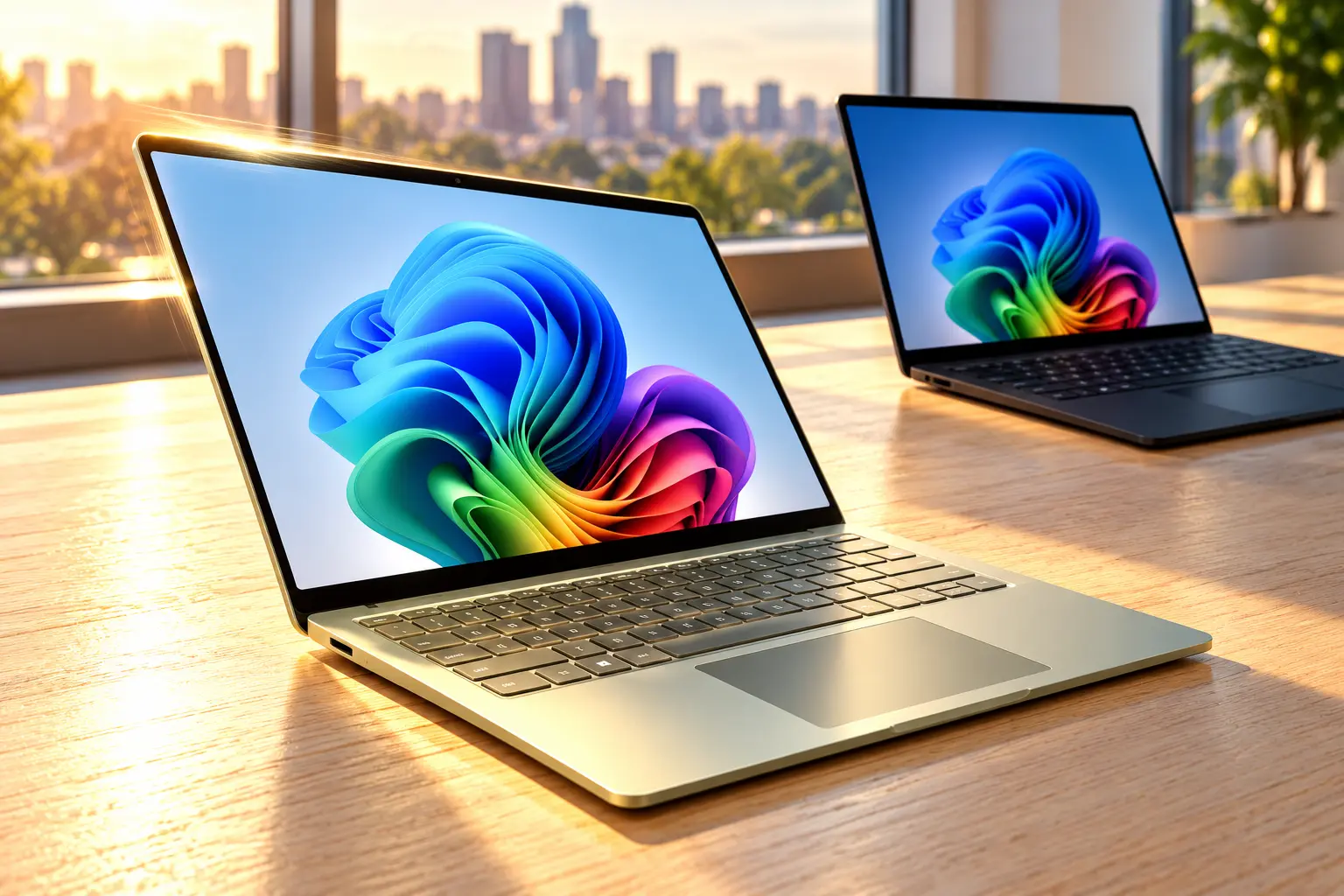
Surface Laptop 8 Specs by Screen Size
The 13.8-inch model is the one most reviews cover, and it is the best default unless you need a larger page or a smaller bag. Microsoft’s own family page separates the three consumer sizes like this.
| Model | Screen | Chip | Weight | Rated battery | Sign-in and ports |
|---|---|---|---|---|---|
| 13-inch | 1920 x 1280, 60Hz | Snapdragon X2 Plus, 6-core | 2.7 lb (1.22 kg) | Up to 22.5 hours video, 18 hours web | Fingerprint; USB 3.2, no Surface Connect |
| 13.8-inch, 8th Edition | 2304 x 1536, 201 PPI, up to 120Hz | X2 Plus 10-core or X2 Elite 12-core | 2.96 lb (1.34 kg) | Up to 20 hours video, 16 hours web | Face login; two USB4, USB-A, Surface Connect |
| 15-inch, 8th Edition | 3270 x 2180, up to 120Hz | X2 Plus 10-core or X2 Elite 12-core | 3.67 lb (1.66 kg) | Up to 19 hours video, 14 hours web | Face login; same ports plus microSD |
The 13.8-inch panel is a 3:2 touchscreen, so a document shows more vertical page than a wide 16:9 laptop. Microsoft rates it at 600 nits. A July 8, 2026 lab pass on a glossy Sharp IPS panel measured a peak of 659 cd/m², with accurate sRGB and P3 profiles and no PWM flicker detected. Overhead office lights still glare off that glass. The spec sheet lists native pen support on the touchscreen. The 1080p webcam includes an infrared Windows Hello camera, so the 13.8-inch and 15-inch models sign you in with your face rather than a fingerprint.
Speakers are clear enough for calls and video, and they thin out in the bass the way most laptop speakers do. Wi-Fi 7 and Bluetooth 5.4 are standard on the 13.8-inch and 15-inch models. There is no HDMI port on any of them, so an external monitor needs USB-C or a dock.
How to Pick RAM for a Surface Laptop 8
Memory on the 13.8-inch Surface Laptop 8 is LPDDR5x, soldered to the board, in steps of 16GB, 24GB, 32GB, or 64GB. The drive is the part you can change later. It is a removable M.2 2230 SSD, and the 13.8-inch Surface Laptop 8 repair page lists 512GB, 1TB, and 2TB as the consumer capacities. On a 512GB review unit, 421GB was free after Windows was installed.
BUY THE RAM FOR THE LIFE OF THE LAPTOP
- 16GB: Order this only if your current laptop rarely fills its memory with your real apps open.
- 24GB: This is the middle step for many browser tabs plus light photo or design work.
- 32GB or 64GB: Pick these if you already hit the ceiling with big files, virtual machines, or several creative apps at once.
- Storage: A larger SSD can go in later; a larger memory chip cannot.
Andreas Osthoff, writing on July 8, 2026, after testing the 10-core X2 Plus in this chassis, put the chip choice in those same terms. The speed gap to the 12-core X2 Elite was small enough that the Elite only paid off when the setup brought more memory or a larger drive.
“The small performance difference to the small Snapdragon X2 Elite means that the switch only makes sense when you need more than 16 GB RAM and 512 GB SSD storage.”
Andreas Osthoff, laptop reviewer, July 8, 2026
The 13.8-inch Surface Laptop 8 is documented as model 2036 or 2138. That number is printed on the top edge of the back cover. Model 2036 is also used on the 13.8-inch Surface Laptop 7, so the sticker alone can mislead you on a used listing. Open Settings and read the processor. Snapdragon X2 is this generation. Snapdragon X, without the 2, is the 2024 laptop.
What Does the Surface Laptop 8 Haptic Trackpad Do?
Advanced haptic features are limited to the 13.8-inch and 15-inch 8th Edition models. The pad has no hinged click bar. A motor under the surface fakes the click from edge to edge, and Windows can add a smaller tap for things happening on screen. Hover the pointer on a window’s close button, snap a window to the side, or drag a file onto a valid drop target, and the pad answers with a light pulse.
Microsoft’s own Surface channel shows that feedback on the new laptops, which is worth a look before you decide the pad is a gimmick.
You can turn the extra signals down, or off, under Settings, then Bluetooth and devices, then Touch. The click can stay when the signals go. The Windows haptic design guidelines also say an action should stay clear from the screen alone if you mute the pad. Microsoft lists the Surface Laptop 8 touchpad, and the business model’s touchpad, among the devices that support the API. Daily feel of the click itself is covered in our haptic trackpad review of this laptop.
The keyboard is backlit, color-matched, and comfortable for a full day of typing. It is also very quiet. Some hands-on notes call the keys a bit spongy if you like a firmer mechanical thunk. Palm rest space beside the pad is generous on the 13.8-inch deck, which matters more on a train ride than another benchmark bar.
How Long Does Surface Laptop 8 Battery Life Last?
The 13.8-inch pack is 54 watt-hours. Microsoft rates that size at up to 20 hours of local video playback and up to 16 hours of active web browsing. The May 2026 Surface battery test used preproduction software on an X2 Plus model with 16GB of RAM and a 512GB SSD. Video playback was a 1080p file in Windows Media Player at 24 frames per second, with the screen at 150 nits, auto-brightness off, and Wi-Fi connected to a network.
A mixed workday is shorter than that video loop. On July 14, 2026, an X2 Elite model lasted just shy of 14 hours with at least 15 Chrome tabs, a notes app, a text editor, chat, and several hours of photo editing. That is the figure to plan around if your day looks like an office, not a movie. The 15-inch rating is up to 19 hours of video and 14 hours of web browsing. The 13-inch rating is longer still, at up to 22.5 hours of video, on a smaller and dimmer screen.
Ports on the 13.8-inch model sit mostly on the left: a 3.5mm headphone jack, one USB-A port at 5 Gbps, and two USB4 ports at 40 Gbps with DisplayPort and charging. Surface Connect is on the right. There is no card reader. The 15-inch model adds microSD. You can charge from either USB-C port. In that July test, a 100W USB-C charger that was not in the box filled the battery in about 100 minutes.
Box contents depend on the country. The US 13.8-inch Surface Laptop store page includes a 39W power supply that plugs into Surface Connect. A UK and EU hands-on the same summer found no charger in the box, so Surface Connect there needs a separate supply, listed around £80. Read the box list for your store before you count on that port on day one.
Which Snapdragon Chip Should You Order?
Snapdragon X2 Plus in the Base Model
The base chip is the Snapdragon X2 Plus, model X2P-64-100. In the 13.8-inch laptop it is a 10-core part: six prime cores up to 4.0 GHz and four performance cores at 3.4 GHz. It can draw 28 watts in a short burst, then settles near 18 watts, on battery or on the charger. Graphics are the Adreno X2-45, clocked at 1350 MHz in the reviewed unit. The neural processor is rated at up to 80 TOPS for on-device Copilot features.
In that July lab, the X2 Plus was slightly faster than the Snapdragon X Elite from the previous Surface Laptop, and close to a 12-core X2 Elite tested in a Surface Pro at the same time. The fan stays quiet in ordinary use and becomes audible when you push a long export. Heat under the keyboard showed up in sustained loads on some hands-on units, so a lap desk still helps for a long render.
Snapdragon X2 Elite When the Setup Needs It
The step-up chip is the 12-core Snapdragon X2 Elite, model X2E-78-100, with a stronger Adreno X2-85 in higher builds. A July 14, 2026 test of an Elite Surface Laptop put single-core speed about 16 to 20 percent ahead of the previous generation, with graphics about 10 percent faster. That is a real step. It is still the same kind of thin Windows laptop, not a workstation.
Pay for the Elite when the memory or storage you want is tied to it, or when a discount drops an Elite setup below a Plus setup with the same RAM. Do not pay for it only to gain two cores on a 16GB, 512GB machine. Business buyers who need faster graphics have a different door: Intel Core Ultra Series 3 models, including the Arc B390, sold as Surface Laptop for Business. Those start higher than the consumer Snapdragon line. One reviewed 13.8-inch business configuration was listed at $3,299, and select business screens add a privacy filter the consumer glossy panel does not have.
Windows on Arm Before You Pay
The consumer laptop runs Windows 11 Home on Arm. A large share of everyday software runs either as a native Arm app or through Prism, the emulator that runs many ordinary x64 programs in the background. Emulated apps can feel slower. A notes app was one example in the July 14 test. Games that install an anti-cheat tool are the usual failure, even when lighter games run at low settings. The Adreno X2-45 is for that lighter play, not for demanding 3D work at 1080p.
CHECK THESE BEFORE YOU ORDER
- Your main app: Install it, or confirm an Arm build, before you sell your old laptop.
- Anti-cheat games: Assume a title that needs a kernel anti-cheat may refuse to launch.
- Peripherals: Odd printers, dongles, and audio tools are the other common miss.
- A faster GPU: If that is the real need, compare a business Intel Surface, not a bigger Snapdragon.
Click to Do is the on-screen shortcut worth trying: hold the Windows key, then click text or an image for copy, search, and quick actions. A July 14, 2026 hands-on called most of the other preinstalled AI tools skippable. Windows on this laptop is also free of the trial clutter many other PC makers add, which is its own kind of relief.
Surface Laptop 8 Prices as of October 2026
Stickers move, and the US Microsoft Store on October 31, 2026, did not match the launch story from June. These are the 13.8-inch consumer prices on that configurator. Discounts were limited to stock on hand, so a color can jump back to full price without notice.
| 13.8-inch setup | US price on the store page |
|---|---|
| X2 Plus, 16GB, 512GB | $1,599.99 in Jade, Platinum, Dune, and Black |
| X2 Elite, 16GB, 512GB | $1,699.99 full price; Jade and Platinum at $1,399.99; Dune at $1,548.00; Black at $1,515.18 |
| X2 Elite, 16GB, 1TB | $1,999.99 full price; Jade discounted to $1,599.99; Platinum still $1,999.99 |
| X2 Plus, 32GB, 512GB | $2,249.99 |
| X2 Elite, 32GB, 1TB | $2,649.99 |
| X2 Elite, 64GB, 1TB | $3,449.99 for the Black setup listed |
The number that matters is the crossover. A discounted X2 Elite with 16GB and 512GB, at $1,399.99 in Jade or Platinum, undercut the X2 Plus sticker of $1,599.99 with the same memory and drive. If that discount is still on the page when you order, the Elite is the better buy at 16GB. If it has ended, go back to the Plus unless you need the memory tier that only comes with the Elite.
On July 14, 2026, UK pricing started at £1,449 ($1,599.99) for the X2 Plus with 16GB and 512GB, and £1,549 for the X2 Elite. Euro pricing in that same review started at €1,699 and €1,799. The 2024 Surface Laptop 7 launched at $999 with 16GB of RAM and 256GB of storage. The 2026 US start of $1,599.99 is $600.99 higher, and it also includes a 512GB drive rather than 256GB. In the UK, the new start was described as £400 above the previous edition’s launch price. Reviewers tie the jump to the high cost of memory.
On the same US family page, the separate 13-inch laptop was listed at $1,199.99 and the 15-inch at $1,699.99. Confirm both, because those figures move with promotions. Microsoft Complete on the 13.8-inch US page is $149 for two years, $219 for three, and $299 for four, covering mechanical failure, drops and spills, and battery wear. Eligible students, parents, teachers, and military can get up to 10 percent off. The US trade-in offer lists up to $500 back on a qualifying device, with the device needing to power on and hold a charge.
Who Should Buy a Surface Laptop 8?
Buy the 13.8-inch consumer model if you want a Windows laptop that stays quiet, lasts a long workday, and has a keyboard and trackpad you will not fight. Touch input is built into the screen, two USB4 ports cover a charger and a dock, and the 3:2 shape suits documents and the web. Order 24GB if 16GB already feels tight, and order 32GB or 64GB only if your current machine is already swapping to disk.
Look at the business Intel line instead if a specific app or game still fails on Windows on Arm, or if you need stronger graphics than the Adreno chip. Look at the 13-inch model if weight and price matter more than the 120Hz screen and the haptic signals. Look at the 15-inch model if you want the taller workspace and the microSD slot, and you can live with 3.67 lb.
If you already own a Surface Laptop 7 and it still does the job, the shell has barely changed. You would be paying the 2026 price mostly for the X2 chip, the haptic signals, and any extra RAM you add. That is a weak reason to replace a laptop that is only two years old. It is a fair reason to choose this one over an older leftover if you are buying a Surface for the first time and the discounted Elite is on the shelf.
Frequently Asked Questions
How Do You Tell a Surface Laptop 8 From a Surface Laptop 7?
Read the four-digit model number on the top edge of the back cover, then confirm the processor in Settings. The 13.8-inch Surface Laptop 8 is documented as model 2036 or 2138, and 2036 is also used on the Surface Laptop 7. Snapdragon X2 means the 2026 laptop. Snapdragon X without the 2 means the 2024 one. Jade green is another clue, because that color is exclusive to the 13.8-inch 8th Edition.
Is the Surface Laptop 8 Screen an OLED Panel?
No. The consumer 13.8-inch and 15-inch panels are LCD touchscreens, not OLED. A pre-launch leak had talked about an OLED option that did not ship on these models. The 13.8-inch unit tested in July 2026 was a glossy IPS panel, with HDR support and no PWM flicker detected, which is easier on sensitive eyes than a flickering OLED dimming method.
Can a Surface Laptop 8 Run Ordinary Windows Apps?
Yes for a large share of everyday software, either as native Arm builds or through Prism, which runs many x64 programs written for Intel and AMD chips. Test the specific app you cannot drop, especially anything that installs anti-cheat, before you rely on the laptop. Emulated apps can feel slower than they do on an Intel PC, and some multiplayer games still will not launch.
Which Surface Laptop 8 Has a MicroSD Slot?
Only the 15-inch consumer model adds a microSD slot. The 13.8-inch model has no card reader. Its ports are two USB4 ports, one USB-A port, a headphone jack, and Surface Connect. If you move photos off a camera card every week, the 15-inch saves you a dongle, at the cost of extra weight.
Does the Surface Laptop 8 Include a Privacy Screen?
Not on the consumer Snapdragon models. Those use a glossy touchscreen without a built-in privacy filter. The privacy option, sometimes called an ePrivacy reader, is on select Surface Laptop for Business Intel models, and it is part of why that line costs more. Sitting with your back to a window still helps on the consumer glass, because the gloss picks up overhead lights.
Order the RAM you expect to keep for years, then compare Plus and Elite prices at that same memory before you pay for the bigger chip. The trackpad is what you notice on the first afternoon. The memory is what you cannot fix once the return window closes.

The Court Revisits the Climate Nuisance Door It Left Open

ChatGPT Now Compiles Live Interfaces With GPT-6

A Tanker Attack Moves the War Into Qatar’s Waters

Personio Buys Circula to Own the DATEV Channel

Bluesky Files for .bsky and Enters the Registry Queue

Microsoft’s 96% Cyber Score Sits at 86.3% on the Board

Musk’s $914 Billion Lead Is a Public SpaceX Bet

Skrilla’s 6-7 Became Word of the Year by Meaning Nothing

Free Live Sports Streaming Without Cable: An Antenna and App Guide

Xbox Puts 15-Hour Caps on Game Pass Cloud Play
-
 NEWS3 months ago
Microsoft’s 96% Cyber Score Sits at 86.3% on the Board
-
 BUSINESS5 months ago
Musk’s $914 Billion Lead Is a Public SpaceX Bet
-
 ENTERTAINMENT1 year ago
Skrilla’s 6-7 Became Word of the Year by Meaning Nothing
-
 SPORTS4 months ago
Free Live Sports Streaming Without Cable: An Antenna and App Guide
-
 GAMING2 months ago
Xbox Puts 15-Hour Caps on Game Pass Cloud Play
-

 ENTERTAINMENT4 months ago
The Odyssey’s IMAX Film Run Hit a 41-Theater Limit
-

 ENTERTAINMENT2 years ago
Andrew Garfield’s Spider-Man Films Are No Longer Free
-

 ENTERTAINMENT4 months ago
Endgame Encore’s $86 Million Trial for Infinity Vision