
NEWS
Home Storage Showdown: NAS, Hardware RAID, or Software RAID?

As home users chase more control and safety over their digital files, the age-old storage debate gets personal. Here’s how NAS, hardware RAID, and software RAID stack up.
If your laptop’s hard drive ever failed with years of family photos on it, you probably learned the hard way that backups aren’t optional. For home users with growing digital needs—from 4K videos to hefty game installs—storage isn’t just about more space. It’s about safety, flexibility, and not losing your stuff when things go sideways.
That’s where NAS, hardware RAID, and software RAID come in. All three offer ways to keep your data safe and accessible, but not everyone needs a server room in their spare bedroom. Let’s break down how these systems work, what makes each unique, and what’s actually worth your time and money.
NAS Isn’t Just for Offices Anymore
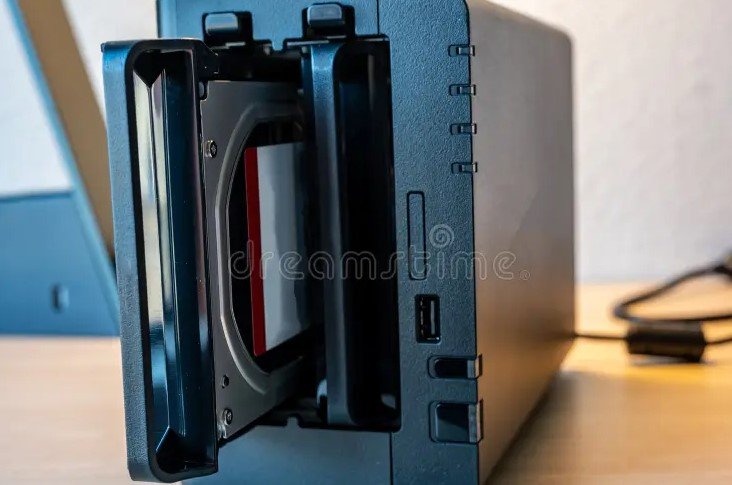
Once considered business-only territory, NAS (Network-Attached Storage) has quietly found its way into homes. It’s a box—usually small enough to fit on a shelf—with multiple hard drives that plug into your home network.
What makes NAS so appealing for regular folks?
-
You can access your files from any device on your network—or even remotely.
-
It doubles as a media server, backup hub, or even a lightweight home cloud.
-
Brands like Synology and QNAP have made NAS systems almost plug-and-play.
That’s a big deal for parents juggling kids’ school files and movies, or creators storing massive video edits. And the setup? Easier than most smart TVs.
Some models come with RAID baked in, giving an added layer of protection in case one drive fails. The better ones let you mix and match drive sizes and upgrade later.
Hardware RAID: Solid, Speedy, but Pricey
Now this one’s old school—but still very much alive.
Hardware RAID uses a dedicated controller to manage multiple hard drives. It lives on a separate card or is baked into the motherboard. The upside? It doesn’t use your computer’s processing power, and it’s wicked fast.
In short bursts, it’s a beast.
But here’s the catch: If that RAID controller dies, your data can get stuck unless you replace it with the exact same model. That’s like losing your car keys and being told the only spare is buried in the desert.
Another sticking point? Cost. You’ll need RAID-grade drives (often SAS-based), a host bus adapter, and a reliable controller. Not ideal if you’re watching your wallet.
Still, it has its place—especially if you’re building a high-performance editing rig or home server.
Software RAID: The DIY Favorite
For budget-conscious tinkerers, software RAID is the go-to. It does the same job as hardware RAID—combining drives and adding redundancy—but runs entirely through your operating system.
Windows, macOS, and most Linux distros all support software RAID in one form or another. No need to buy extra hardware. No extra cables. Just a few clicks (or terminal commands), and you’re good to go.
Performance can lag behind hardware RAID, sure. And if your OS crashes, you might have to fiddle a bit. But the upside?
-
It’s free (or almost free)
-
Easily portable
-
Flexible to set up and expand
For casual users or hobbyists who just want some backup protection without dropping big bucks, this one’s a solid win.
Which One’s Best for Home Use?
This is where it gets personal. There’s no universal answer—just what fits your setup best. But we can sort the options based on some common scenarios.
Here’s a handy comparison:
| Feature | NAS | Hardware RAID | Software RAID |
|---|---|---|---|
| Setup Difficulty | Easy to moderate | Moderate to difficult | Moderate |
| Performance | Good | Excellent | Decent |
| Cost | Medium | High | Low |
| Data Recovery Ease | Moderate | Difficult without same controller | Easy with same OS |
| Remote Access | Yes | No | No |
| Upgrade Flexibility | High | Medium | High |
It’s not just about tech specs either. Comfort matters. If you’re not someone who enjoys troubleshooting firmware updates or boot loaders, simpler may be better.
The Hidden Costs and Quirks You Should Know
All these options have fine print that doesn’t make the box label.
With NAS, storage efficiency depends on the RAID type you choose. RAID 5 gives decent protection and space, but rebuilding can take forever. RAID 1 mirrors data, which is safer but halves your available storage. Some NAS boxes also get sluggish if you max out the drive bays with cheap drives.
Hardware RAID can be touchy when you swap drives. Not all controllers play nice with different brands or firmware. And replacing a failed controller isn’t always quick—or affordable.
Software RAID can throw you curveballs during OS upgrades. Compatibility issues or boot failures aren’t unheard of. So regular users might want to keep a clone or second backup.
Sometimes, just using a good external SSD with cloud sync is enough. Really.
So What Are People Actually Buying?
Let’s talk real-world behavior. Based on retail trends from 2024:
-
Synology’s 2-bay NAS boxes were among the bestsellers on Amazon and Newegg.
-
Western Digital’s My Cloud Home and QNAP’s TS series dominated the plug-and-play crowd.
-
On forums like Reddit’s r/DataHoarder, software RAID setups using Unraid or ZFS still rule for DIY fans.
In fact, a Statista report from late 2024 showed over 61% of home users preferred NAS setups over standalone RAID solutions. That’s partly because of ease. And partly because, let’s face it, no one wants to troubleshoot RAID 6 errors on a weekend.

Senate Advances a College Sports Bill Athletes Did Not Write

Tarantino Hands Off Cliff Booth, Then Novelizes Him Anyway

AcademyAI Raises £1.65 Million to Score Staff AI Skills

Vinicius and Mbappe Hid the Ceuta Shirt Madrid Posted

Google Inherits Samsung Gallery Backup as OneDrive Exits

Musk to Dell: How AI Split the World’s 10 Richest in 2026

Microsoft’s 95.95% Cyber AI Score Skips Its Own Leaderboard

Free Live Sports Streaming in 2026: What to Watch Without Cable

G20 Cheers AI Investment After Bailey’s Frontier Cyber Warning

Retail Banking vs Commercial Banking: A Comprehensive Guide
-
 NEWS4 months ago
Musk to Dell: How AI Split the World’s 10 Richest in 2026
-
 NEWS2 months ago
Microsoft’s 95.95% Cyber AI Score Skips Its Own Leaderboard
-
 SPORTS3 months ago
Free Live Sports Streaming in 2026: What to Watch Without Cable
-
 NEWS3 weeks ago
G20 Cheers AI Investment After Bailey’s Frontier Cyber Warning
-
 BUSINESS2 years ago
Retail Banking vs Commercial Banking: A Comprehensive Guide
-

 ENTERTAINMENT4 weeks ago
Sterling Point Holds No. 2 on Prime Video After 32 Days
-

 ENTERTAINMENT2 years ago
Andrew Garfield’s Amazing Spider-Man Movies Now Streaming for Free
-

 BUSINESS3 months ago
Friarwood Wine Merchant Collapses Into Administration After 59 Years