
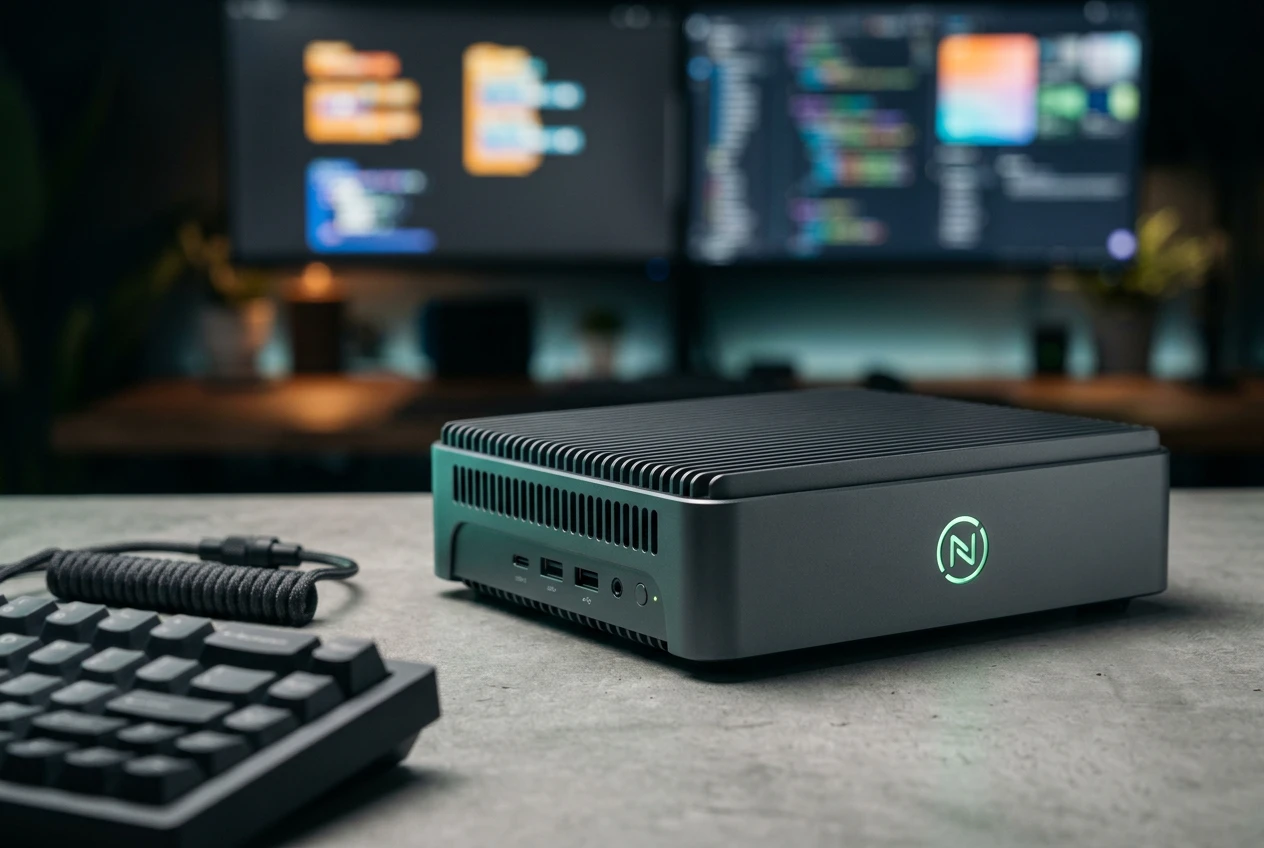
Microsoft opened its Build 2026 developer conference in San Francisco on June 2 with a piece of hardware that looks like an Xbox someone flattened with a piano: the Surface RTX Spark Dev Box, a compact workstation built on NVIDIA’s RTX Spark superchip, carrying 128GB of unified memory and up to one petaflop of AI compute. The machine can run 120-billion-parameter models with a million-token context window locally, no cloud round-trip required.
Microsoft paired that hardware with a batch of Linux tooling and a one-command developer setup for Windows 11. Together they point at something bigger than one mini-PC. After years of watching developers do their container work, shell scripting and local model testing on Macs, Microsoft wants Windows to be the host machine where all of it runs.
What Microsoft Put on the Build Stage
The headline object is the box itself. Its aluminium casing was designed to double as a heatsink, and it ships with a version of Windows 11 Pro that boots straight into a developer-tuned state: PowerShell 7 as the default shell, Developer Mode switched on, dark theme enabled, and Do Not Disturb running out of the gate. Andrew Hill, Microsoft’s Corporate Vice President for Surface Product, laid out the configuration in Microsoft’s Surface devices blog detailing the Dev Box.
The chip doing the work is NVIDIA’s Spark-class silicon, the same family behind NVIDIA’s DGX Spark personal AI supercomputer. It pairs a 20-core Arm-based Grace CPU with a Blackwell-generation RTX GPU and a shared 128GB memory pool, the design our earlier coverage of NVIDIA’s RTX Spark superchip for Arm Windows PCs walked through. The unified memory matters here: it lets the GPU address far more model weight than a typical gaming card’s dedicated VRAM, which is why a desktop this size can hold a 120-billion-parameter model at all.
The numbers Microsoft is leading with:
- 128GB unified memory, shared across the Grace CPU and Blackwell GPU.
- Up to 1 petaflop of AI compute at low-precision math.
- 120-billion-plus-parameter models with a one-million-token context, run on the desk.
- Preloaded VS Code, GitHub Copilot, Git, Python and Node.js, plus WSL 2 wired up with GPU passthrough and CUDA support.
Run 120B+ parameter models with 1 million token context locally at interactive speeds.
That capability line comes straight from Microsoft’s product description. The pitch is local-first AI development: build and test large models on the device, then push to the data center when you need scale. The catch arrives at the bottom of the announcement. The Dev Box is a pre-release product, it goes on sale later this year in the United States only, exclusively on Microsoft.com, and Microsoft has not named a price.
Coreutils, WSL 3 and a One-Command Setup
The software half of the keynote is where the strategy shows. Microsoft used Build to ship a set of changes that pull Linux workflows deeper into Windows itself, not into a separate machine a developer keeps on the side.
The Tooling That Shipped
- Windows Developer Configuration reached general availability. It uses WinGet, the Windows Package Manager, to stand up a tuned Windows 11 environment, common tools and settings, from a single declarative file. The WinGet-based Windows configuration files let a team check a setup into source control and reproduce it on any machine.
- Coreutils, the Linux-style command-line utilities developers reach for instinctively, now run natively on Windows 11 instead of only inside a Linux distribution.
- WSL, the Windows Subsystem for Linux, gained the ability to create, run and interact with Linux containers directly, work that previously leaned on a separate Docker layer.
- An Intelligent Terminal feeds context from your session to your preferred AI agent, so the command line and the model see the same working state.
The deeper change is WSL 3. It moves to a paravirtualized hardware access model that lets the Linux kernel talk to the Windows GPU and the NPU (neural processing unit, the chip block built for AI math) at near-native speed. WSL 2 throttled exactly this kind of access, which is part of why heavy local AI work kept leaking off Windows. You can read the architecture in the Windows Subsystem for Linux documentation. Put the GPU passthrough and the container support together and a Linux workload on Windows starts to behave like one on a Linux box.
Why Windows Wants Linux Work Back
For more than a decade, the default developer laptop at a lot of companies has been a MacBook. The reasoning was practical: a Unix shell, easy access to Linux-style tooling, and a smooth path to deploying on Linux servers. Windows could run that stuff, but it always felt like a guest on its own operating system.
Local AI is the opening Microsoft is using to change that. Running large models on a developer’s own hardware needs three things at once: a fast GPU, a lot of memory the GPU can reach, and Linux tooling that talks to both without friction. The Dev Box supplies the silicon, WSL 3 supplies the kernel-level hardware access, and Coreutils plus native container support remove the daily papercuts. The bet is that a developer building agents and local models will find fewer reasons to switch machines.
There is a defensive edge to it too. Governments and enterprises are rethinking their OS commitments, with France’s planned shift from Windows to Linux across government systems the loudest recent example. Microsoft’s counter is to make Windows the place Linux already lives, so the choice stops feeling like Windows or Linux and starts feeling like Windows with Linux inside it.
Project Volterra Casts a Long Shadow
This is not the first time Microsoft has built a small box to steer developers toward a platform shift. The Dev Box is a follow-up to the Windows Dev Kit 2023, known internally as Project Volterra, a Qualcomm Snapdragon 8cx Gen 3 machine that was essentially a Surface Pro mainboard in a plastic shell. It shipped alongside Arm-native versions of Microsoft’s developer tools.
That earlier kit did its job quietly. It helped seed the Arm app ecosystem ahead of the Arm-based Surface flagships that followed, and it gave Microsoft a reason to invest in Prism, the x86-to-Arm code translation layer that made those machines usable with software that had never been recompiled. The Dev Box runs the same playbook for a different goal: instead of selling developers on Arm, it is selling them on Windows as a local AI host.
| Spec | Surface RTX Spark Dev Box | Windows Dev Kit 2023 (Volterra) | NVIDIA DGX Spark |
|---|---|---|---|
| Chip | NVIDIA RTX Spark (Grace + Blackwell) | Qualcomm Snapdragon 8cx Gen 3 | NVIDIA GB10 Grace Blackwell |
| Memory | 128GB unified | 32GB | 128GB unified |
| Main job | Local AI and Linux dev on Windows | Seeding Arm-native Windows apps | Standalone local AI supercomputer |
| Status | Pre-release, U.S. later this year | Shipped, now legacy | On sale |
The history is also a warning. Volterra mattered to a narrow slice of developers and never sold in volume, which is exactly what a niche dev kit is supposed to do. The Dev Box carries a far heavier strategic load on the same kind of low-volume hardware.
The Gaps in the Pitch
Strip the keynote polish and a few real questions sit unanswered. The first is money. A machine with a Grace Blackwell-class chip and 128GB of memory is not going to be cheap, and Microsoft naming no price at launch leaves developers unable to judge whether the box beats a comparable NVIDIA Spark desktop or a loaded workstation they could build themselves.
The second is reach. Selling only in the United States, only through Microsoft.com, caps the audience hard for a product whose whole argument is keeping developers on Windows worldwide. The third is the oldest problem in this category: adoption does not follow hardware. The Linux tooling, WSL 3 and the WinGet setup system reach every Windows 11 machine, and those will decide whether the strategy works long after the Dev Box itself sells through a small batch.
Microsoft also has a pattern of generous-looking developer moves that arrive with conditions attached, as our look at Microsoft’s open-source releases that still come with limits traced. The Linux tooling here is genuinely useful, and it also pulls developers further inside an ecosystem Microsoft controls top to bottom, from the silicon image to the agent runtime. Availability is set for later this year, U.S. only, with no price attached. Until Microsoft names one, the Dev Box is a statement of intent more than a product anyone can buy.
Frequently Asked Questions
What is the Surface RTX Spark Dev Box?
It is a compact developer workstation Microsoft announced at Build 2026, built around NVIDIA’s RTX Spark superchip with 128GB of unified memory and up to one petaflop of AI compute. It ships with a Windows 11 Pro image pre-configured for development, including preinstalled tools and WSL 2 with GPU passthrough.
How much does the Dev Box cost and when can you buy it?
Microsoft has not announced a price. The device is a pre-release product expected to go on sale later this year in the United States only, sold exclusively through Microsoft.com.
Can it run Linux tools?
Yes. The Dev Box runs Linux workloads through WSL, and Build 2026 added native container creation, Coreutils command-line utilities that run directly on Windows 11, and WSL 3 GPU and NPU passthrough for local AI work.
How is the RTX Spark chip different from NVIDIA’s DGX Spark?
Both use NVIDIA’s Spark-class Grace Blackwell silicon with 128GB of unified memory. The DGX Spark is NVIDIA’s own standalone desktop AI supercomputer, while the RTX Spark Dev Box is Microsoft’s Windows-tuned machine aimed at developers working inside the Windows and WSL environment.
What is Windows Developer Configuration?
It is a system, now generally available, that uses WinGet to set up a tuned Windows 11 environment from a single declarative file. A team can store the configuration in source control and reproduce the same tools and settings on any machine.