
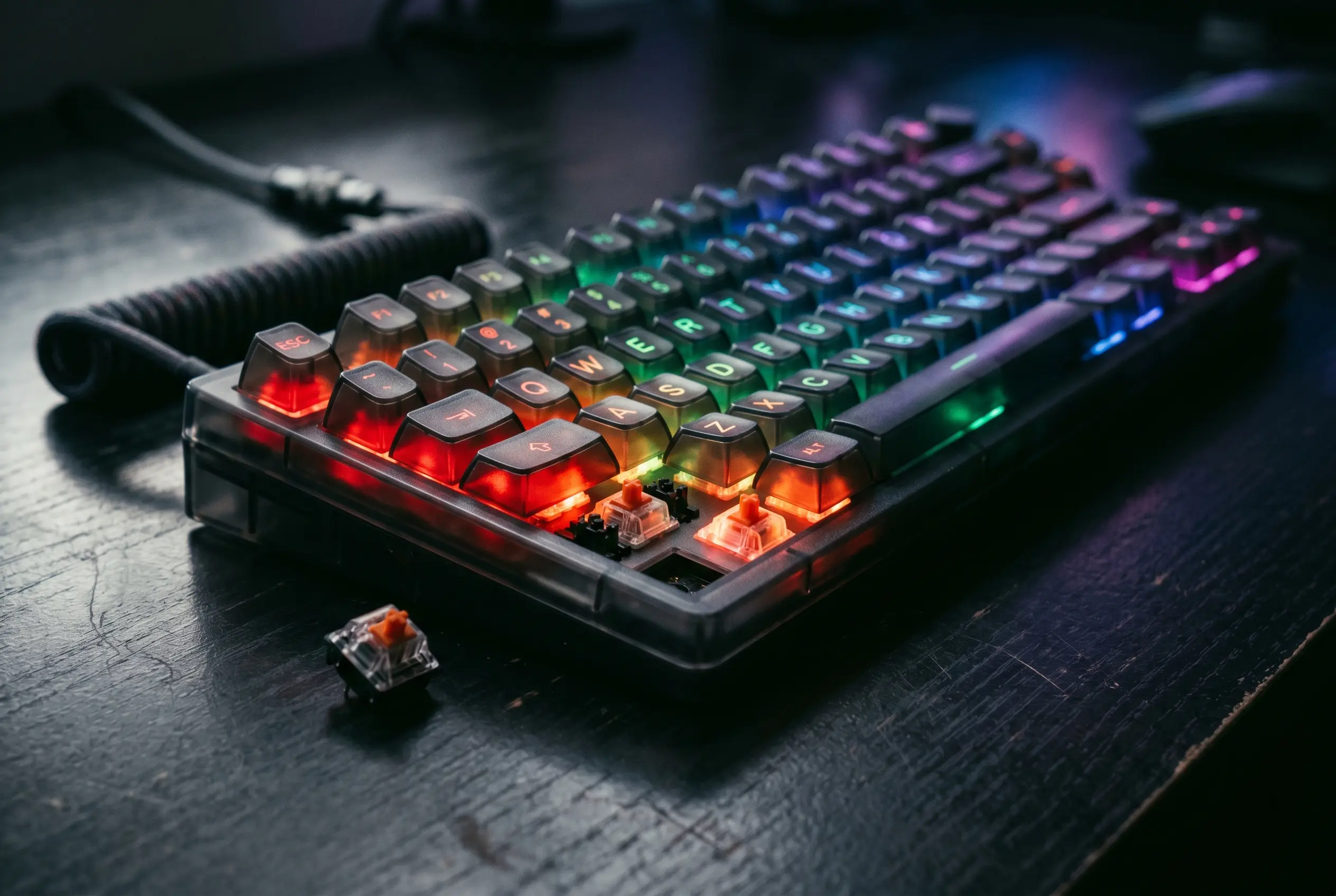
The HyperX Origins 2 1800 is a full-size mechanical gaming keyboard with hot-swappable switches and a translucent body that pushes RGB lighting harder than most boards on the market. TechRadar scored it 4 out of 5 in a June 2026 review by Lewis Maddison, calling the stock linear switches satisfyingly clicky and the software disappointingly basic. At $139.99 in the US and £119.99 in the UK, the board sits below the Razer BlackWidow V4 Pro in list price and above budget boards like the Gamakay TK75 V2. For buyers who want pure mechanical feel and are willing to live with limited software, the full HyperX Origins 2 1800 review lays out the trade-offs.
The Verdict at a Glance
The Origins 2 1800 earned a 4 out of 5 overall from Maddison, the same score it received in the value and performance categories, with a 3.5 out of 5 in design and features the only blemish. The headline strengths, per the review, are the hot-swap hardware, the clicky linear switches, and the comfort the board delivers despite its thickness. The headline weaknesses are the stock keycaps, the volume, and the limited HyperX Ngenuity software.
The takeaway lands on a question of priority. Buyers who prize mechanical feel and hands-on customization get a board that Maddison describes as hard to beat at this price. Buyers who need deep software tweaks or who type more than they game will hit the same friction the review surfaced.
- Pros: Plenty of hardware customizations, great mechanical clickiness from the stock switches, comfortable to use despite thickness
- Cons: Stock keycaps aren’t great for typing, a little loud, lacks software customizations
Price and Hardware Specs
The Origins 2 1800 costs $139.99 in the US and £119.99 in the UK (about AU$200), and is available now in black only. The keycaps, switches, and body can all be swapped out, a setup Maddison calls hot-swap and uses to justify the price against the Razer BlackWidow V4 Pro, which carries a slightly higher list price.
The full-size board measures 15.3 x 5.5 x 1.8 inches (388 x 140 x 46mm) and ships with mechanical switches and customizable RGB backlighting. Programmable keys are included. The board is wired, with a braided USB-C cable that Maddison found easy to maneuver.
| Spec | Detail |
|---|---|
| Layout | Full-size |
| Switch | Mechanical |
| Programmable keys | Yes |
| Dimensions | 15.3 x 5.5 x 1.8 in / 388 x 140 x 46mm |
| RGB or backlighting | Yes (customizable) |
The Switches Earn Their Keep
With the stock red linear switches installed, the Origins 2 1800 produces what Maddison calls a gratifying sound and a snappy, responsive feel. The keys are light, with minimal but effective dampening and generous travel distance, and they rebound quickly. The actuation point is forgiving, which meant Maddison didn’t suffer mispresses during gaming sessions. The volume runs on the louder side compared to other mechanical boards.
The WASD position feels natural, supported by the board’s slanted angle and the central dip in the middle row. Maddison found the space bar comfortable too, with a soft curve that kept him from hitting its edge. The other keycaps have prominent indentations that offer secure presses, and the board’s forward tilt kept his hands from reaching the edge of the chassis.
Where the board loses points is typing. The sheer height of the stock keycaps catches the fingers as they move from key to key, slowing the typist and introducing errors. The same comfort that helps the WASD position works against prose, a trade-off buyers who split their time between gaming and typing will feel on every paragraph.
Performance scored 4 out of 5 in the review, with the “less so for typing” caveat the only dent in an otherwise clean performance rating.
The Software Doesn’t Keep Up
The latest HyperX Ngenuity software is required to customize the Origins 2 1800, and the feature set is thin. Users can adjust RGB lighting, record macros, and rebind keys, with a generous selection of system and media functions mappable. Performance-related tweaks are absent, and so is the SOCD function that elite competitive gamers often expect. Maddison called the feature set disappointingly basic.
The install itself added friction. Ngenuity refused to open on Maddison’s main gaming PC after installation, forcing a second install on a separate Windows 11 machine before any customization was possible. The board ships as wired-only, so any software setup has to happen on a machine where Ngenuity will actually run. For a board that charges a premium price, the software experience trails the hardware by a clear margin.
A Translucent Build Wrapped in Plastic
The Origins 2 1800 stands out in the gaming keyboard crowd with a translucent dark-grey body that lets the RGB backlighting shine through. The keycap characters are fully transparent, so they illuminate as well, and the lighting itself is, in Maddison’s words, probably the brightest RGB he’s ever seen in a keyboard. That translucency gives the board an identity most of its rivals don’t have.
This is probably the brightest RGB I’ve ever seen in a keyboard, and it helps the board to stand out among its peers.
Underneath the glow, the construction is plastic rather than aluminum, with a noticeable amount of flex if you press on the body. The two panels fit together solidly, and the board stays light despite its thickness, a combination that surprised Maddison given how dense the chassis looks. A small crosshead screwdriver (not included) is all that’s needed to swap the housing, thanks to easy-access screws underneath.
The board’s thickness would normally pose an ergonomic problem, but the generous forward tilt and the dip in the middle row keep the hands in a natural position. Folding feet add more angle, though the difference is smaller than on other boards. The braided USB-C cable is light and easy to maneuver, stiffer than a typical mouse cable but built for daily use. No wrist rest ships in the box.
Where It Sits Against Razer and Gamakay
The Razer BlackWidow V4 Pro sits just above the Origins 2 1800 in list price, and Maddison tested its wireless sibling, the BlackWidow V4 Pro 75%, calling it among the best mechanical keyboards in terms of feel, performance, and build quality. Against that benchmark, the Origins 2 1800 holds its ground on switch feel while undercutting on price.
For buyers on a tighter budget, the Gamakay TK75 V2 is considerably cheaper than the Origins 2 1800 and still delivers great key feel and respectable build quality per the review. The Origins 2 1800 charges more for hot-swap hardware, brighter RGB, and the option to swap the body itself.
- Razer BlackWidow V4 Pro: Slightly higher list price than the Origins 2 1800. Maddison tested the wireless BlackWidow V4 Pro 75% and called it among the best mechanical keyboards for feel, performance, and build quality.
- Gamakay TK75 V2: Considerably cheaper than the Origins 2 1800, with great key feel and respectable build quality per the review.
| Category | Score | Notes |
|---|---|---|
| Value | 4/5 | It’s expensive, but reasonably priced compared to the competition. |
| Design and features | 3.5/5 | Thick but light and comfortable. Plenty of hardware customizations, but few software ones. |
| Performance | 4/5 | Fantastically clicky and snappy switches. Great for gaming, less so for typing. |
| Overall | 4/5 | A great mechanical keyboard, slightly let down by the lack of performance tweaks. |
How It Was Tested
Maddison tested the Origins 2 1800 for several days across two Windows 11 PCs with x64 CPUs, using it for gaming, working, and general browsing. The Ngenuity software refused to install on his main PC, so customization was tested on a secondary machine. He has been PC gaming for over a decade and has reviewed a large number of keyboards across price points and switch types.
Frequently Asked Questions
Is the HyperX Origins 2 1800 worth buying?
The board earned a 4 out of 5 in TechRadar’s June 2026 review. Maddison called it hard to beat at this price for buyers who want a pure mechanical feel and don’t need deep software. The catch is the limited Ngenuity software and the stock keycaps that hurt typing.
How does it compare to the Razer BlackWidow V4 Pro?
The Razer BlackWidow V4 Pro’s list price is slightly above the Origins 2 1800’s $139.99. In testing the wireless BlackWidow V4 Pro 75%, Maddison rated it among the best mechanical boards for feel, performance, and build quality, a benchmark the Origins 2 matches on switch feel while undercutting on price.
Can you swap the switches and keycaps on the Origins 2 1800?
Yes. The keycaps, switches, and body can all be swapped out, with easy-access screws underneath the housing and a small crosshead screwdriver (not included) for disassembly. That’s the hot-swap setup that justifies the price against the Razer BlackWidow V4 Pro, per the review.
What kind of switches does the Origins 2 1800 use?
The board ships with red linear switches as stock. They’re light, with generous travel, minimal but effective dampening, and a forgiving actuation point, and they produce a gratifying but slightly louder clicky sound.
Is the Ngenuity software good enough for the Origins 2 1800?
It handles RGB, macros, and key rebinding, with numerous system and media functions mappable, but it lacks performance-related tweaks and the SOCD function that elite gamers expect. In testing, Ngenuity refused to open on one Windows 11 PC, requiring a second install on a separate machine.