
NEWS
Google Pixel Exclusive Features Worth Buying the Phone For
Google Pixel exclusive features are mostly software: Now Playing, Video Boost, Add Me and more, plus which Pixel model unlocks each one and why the edge fades.

Most buying guides recommend a Google Pixel for two reasons: the camera and the clean version of Android. Both are genuine selling points, yet neither is truly exclusive anymore. The Google Pixel exclusive features that actually pin you to the brand are mostly software, not hardware. Phones from Samsung and Motorola run the same Android operating system, but they still can’t run Now Playing, advanced voice typing, Video Boost, or Add Me, because Google builds those tools around its own Tensor processor and cloud.
That software bundle is the catch worth understanding before you spend. Several of the most useful tricks live only on the Pro models or the newest hardware, and a few of them have already stopped being Pixel-only because Apple and Samsung copied them. Here is what you get, which phone you need to get it, and how long the head start tends to last.
The Software Layer Rivals Can’t Just Download
Gboard, Google’s keyboard, ships on a huge slice of Android phones. The Pixel build is different. So is the camera app, the Phone app, and the lock screen. Google treats its own hardware as the launch vehicle for features that lean on Tensor’s on-device machine learning, which is why a Galaxy or a OnePlus can sit on the same Android version and still come up short.
The practical result is a set of conveniences you can’t add later through the Play Store. You either bought the phone that runs them or you didn’t. That is a real reason to choose a Pixel, and it is also why the brand keeps a loyal base even when its raw performance trails Samsung’s flagships.
It is worth being clear-eyed about the cost, too. Some of the splashiest extras now sit behind a Google AI subscription bundled with the Pixel 10 Pro, and the free year can lapse faster than buyers expect. The core exclusives below, though, cost nothing extra once the phone is in your hand.
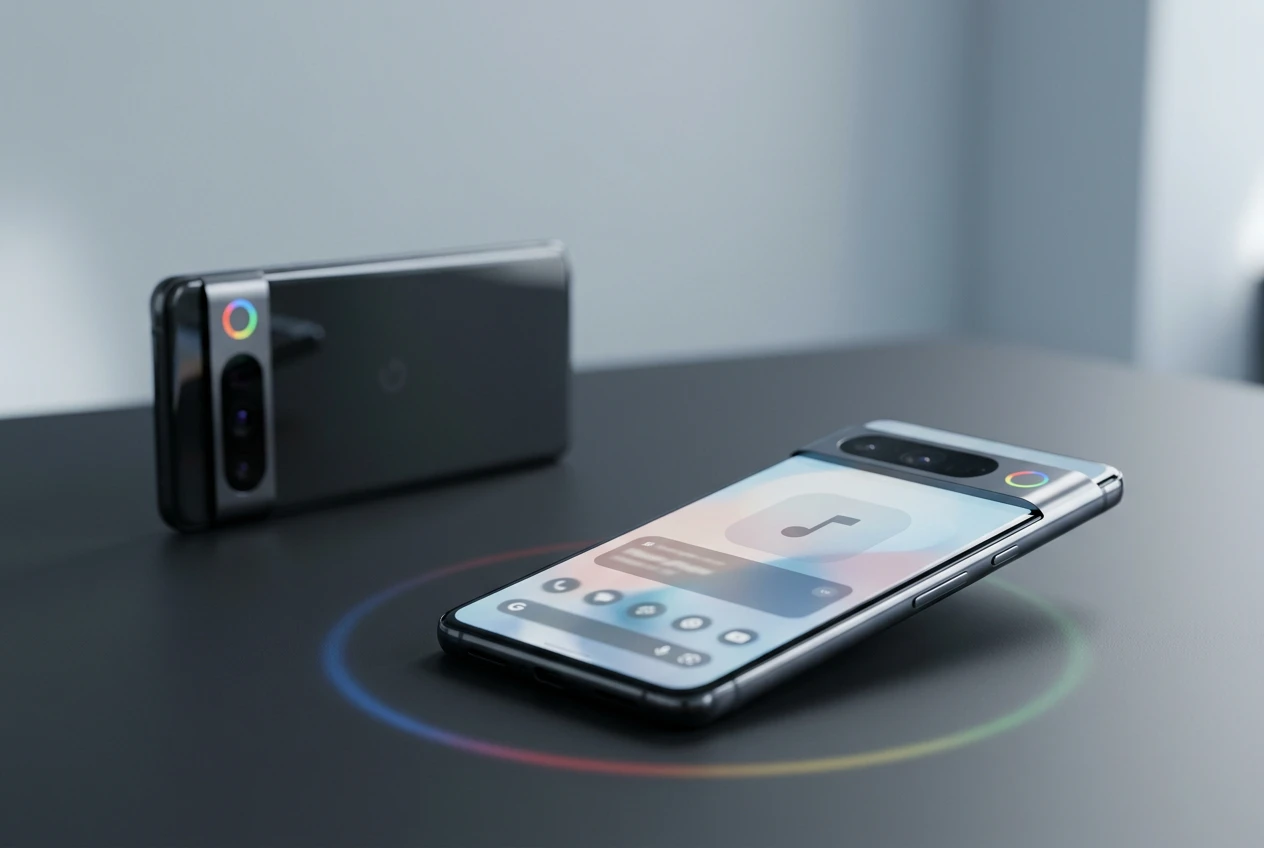
Now Playing Names Songs With the Screen Off
Now Playing is the oldest of the bunch and still the easiest to fall in love with. Sit in a cafe, and the phone quietly identifies the track and prints the title on the lock screen. No app to open, no button to press. It works like Shazam without the friction.
The clever part is that it runs offline. When you switch the feature on, the Pixel downloads a local database of songs and matches what it hears on-device, so it keeps recognizing music with no internet connection and nothing leaving the phone. Every catch lands in a history list, which turns into a running diary of what played around you over months.
Google recently repackaged Now Playing as a standalone app on the Play Store for Pixel phones, redesigned so you can search that history, connect a streaming service to hear the full track, and even hum a tune to find it. A coming Pixel Drop, the quarterly feature update Google ships to its phones, adds manual search to the tool as well. To use the app you need a Pixel 6 or newer running current software.
Voice Typing and Call Tools Built on Pixel Silicon
Two of the most underrated exclusives sit in places you use every day: the keyboard and the Phone app. Both look ordinary until you compare them with the same apps on another brand.
Advanced Voice Typing in Gboard
Tap the microphone on Gboard on any Android phone and you can dictate. On a Pixel it works differently once you turn on the advanced toggle under Gboard Settings, Voice Typing, then “Advanced voice typing features.” The mic icon glows in the Google Assistant colors, dictation gets noticeably faster and more accurate, and the system inserts punctuation on its own. Say “delete” or “clear” and it treats those as commands instead of typing the words out. It also juggles multiple languages automatically, and on a Pixel 8 or newer you can issue more specific spoken commands.
Call Screen and Hold for Me
Call Screen, which Google launched back in 2018, lets the Assistant answer an unknown number, ask who is calling, and show you a live transcript so you can pick up or hang up with full context. Hold for Me waits on hold for you and pings when a human returns. For years these were the cleanest reason to hand someone a Pixel and watch their face when the spam call got handled for them.
Camera Tricks From Video Boost to Add Me
The camera is the Pixel’s signature, mostly thanks to computational photography that balances a shot before you even try. Dig into the app and two features stand out as things rival phones simply do not offer.
Video Boost on the Pro Models
Video Boost is locked to the top-tier Pro phones, starting with the Pixel 8 Pro. Record with it on, and the Pixel keeps a temporary file on the device while sending a copy to Google Photos, where AI cleans up detail and exposure, cuts noise in low light, and lifts color in daylight. On the latest Pixel Pro video processing tools from Google, Video Boost also smooths high-motion footage into steadier, more cinematic clips.
Add Me for Group Shots
Add Me solves the oldest problem in phone photography: the person holding the camera never makes it into the picture. You shoot the group once, then swap places with someone and shoot again, and the camera stitches everyone into a single frame. On the Pixel 10 series it stretches to cover pets and larger groups. Add Me arrived with the Pixel 9 family, so you need that generation or newer to use it.
Which Pixel Model Unlocks Which Feature
Not every exclusive runs on every Pixel, and you do not need the priciest model to get most of them. The budget Pixel 10a covers a lot of this list while undercutting rival $500 phones. Here is the quick reference for the headline features and the hardware floor each one needs.
| Feature | What it does | Minimum Pixel |
|---|---|---|
| Now Playing app | Identifies songs offline on the lock screen | Pixel 6 |
| Advanced voice typing | Faster Gboard dictation with spoken commands | Pixel 8 for full commands |
| Video Boost | AI video cleanup through Google Photos | Pixel 8 Pro (Pro only) |
| Add Me | Puts the photographer into the group photo | Pixel 9 |
| Call Screen | Assistant screens and transcribes unknown calls | Pixel 3 and newer |
Seven Years of Updates and Near-Stock Android
The software promise is its own exclusive. Google leads the Android Open Source Project documentation, so Pixels are first in line for new Android versions and run the closest thing to Android the way Google designed it. If you like the Material 3 Expressive look, a Pixel is the surest way to see it on day one.
The support window backs that up:
- Seven years of operating system updates on the Pixel 8 and newer, matching Samsung’s pledge from the Galaxy S24 onward.
- Four Pixel Drops a year, the feature updates that add tools between major Android releases.
- One software identity across the lineup, where Samsung’s One UI looks and behaves nothing like Google’s build.
That last point cuts both ways. Some buyers actively miss the extras Samsung layers on top, a gap one writer documented in detail after switching, in our look at the One UI tools that go missing on a Pixel. And clean software does not mean bug-free software, as our rundown of Pixel 10 problems owners still hit in 2026 makes plain.
Why the Best Pixel Exclusives Don’t Stay Exclusive
Here is the part the marketing skips. The strongest Pixel features tend to have a clock on them, because Apple and Samsung watch what works and ship their own versions. Call Screen is the clearest case. After roughly seven years as a Pixel signature, a near-identical screening tool arrived on the iPhone with iOS 26, Apple’s mobile software, and Samsung built its own into the Galaxy S26.
The pattern repeats across the list:
- Call Screen and Hold for Me went from Pixel-only to copied by both Apple and Samsung.
- Live call transcription now shows up in Galaxy AI on Samsung’s latest flagship.
- Quick Tap, the back-of-phone gesture, is a feature Google itself borrowed from the iPhone.
Given how Android works, few of these conveniences stay walled off for long, and many trickle down to other Android brands within a generation or two. The honest read is that the Pixel’s edge is timing more than permanence. You get the good stuff first, sometimes years first, and Google keeps refilling the well with each Pixel Drop. For a buyer who values being early and wants the cleanest Android going, that head start is still worth paying for. For someone happy to wait, the best ideas usually arrive on other phones eventually.
Frequently Asked Questions
What features are exclusive to Google Pixel phones?
The main Pixel-only features are Now Playing, advanced voice typing in Gboard, Video Boost, Add Me, and the near-stock Android build with quick Pixel Drop updates. Call Screen and Hold for Me were exclusive for years before Apple and Samsung added their own versions.
Do I need the most expensive Pixel to get these features?
No. The budget Pixel 10a covers most exclusives, including Now Playing, advanced voice typing, Add Me, and Call Screen. The main exception is Video Boost, which runs only on the Pro models starting with the Pixel 8 Pro.
Does Now Playing work without internet?
Yes. When you enable Now Playing, the Pixel downloads a local song database and matches audio on-device, so it identifies music with no internet connection and nothing sent to the cloud. You only need a connection to stream the full track later.
Which Pixel models get Video Boost?
Video Boost is limited to the top-tier Pro phones, beginning with the Pixel 8 Pro and continuing on newer Pro models. The Pixel 10 Pro adds stronger stabilization that smooths high-motion footage into steadier clips.
How long do Pixel phones get software updates?
Google promises up to seven years of operating system updates on the Pixel 8 and every model after it, plus quarterly Pixel Drops that add new features between major Android releases.
Are Pixel exclusive features coming to other phones?
Some already have. Call Screen reached the iPhone with iOS 26 and the Galaxy S26, and other tools tend to trickle to additional Android brands within a generation or two. Pixels typically get these features first, often by a wide margin.

The Court Revisits the Climate Nuisance Door It Left Open

ChatGPT Now Compiles Live Interfaces With GPT-6

A Tanker Attack Moves the War Into Qatar’s Waters

Personio Buys Circula to Own the DATEV Channel

Bluesky Files for .bsky and Enters the Registry Queue

Musk’s $914 Billion Lead Is a Public SpaceX Bet

Microsoft’s 96% Cyber Score Sits at 86.3% on the Board

Endgame Encore’s $86 Million Trial for Infinity Vision

Free Live Sports Streaming in 2026: What to Watch Without Cable

Andrew Garfield’s Spider-Man Films Are No Longer Free
-
 BUSINESS4 months ago
Musk’s $914 Billion Lead Is a Public SpaceX Bet
-
 NEWS2 months ago
Microsoft’s 96% Cyber Score Sits at 86.3% on the Board
-
 SPORTS3 months ago
Free Live Sports Streaming in 2026: What to Watch Without Cable
-
 ENTERTAINMENT3 months ago
Endgame Encore’s $86 Million Trial for Infinity Vision
-
 ENTERTAINMENT2 years ago
Andrew Garfield’s Spider-Man Films Are No Longer Free
-

 NEWS4 months ago
Singapore’s 3×3 and Surfing Debuts Miss the Medal Stand
-

 ENTERTAINMENT1 month ago
Sterling Point Holds No. 2 on Prime Video After 32 Days
-

 NEWS6 months ago
White Sands Footprints Put People in Ice Age New Mexico