
Android tablets rarely steal the spotlight anymore. Phones keep getting bigger, laptops thinner, and many slates land somewhere in between, unsure of themselves. Then along comes Lenovo’s latest Yoga Tab, and suddenly the category feels… alive again.
This tablet isn’t flashy for the sake of it. It’s thoughtful, comfortable, and surprisingly complete.
A design that actually earns its keep
The first thing you notice about the Lenovo Yoga Tab is that it doesn’t pretend to be just a flat screen.
The built-in kickstand is the heart of the design. It snaps on magnetically, feels sturdy, and instantly makes the tablet easier to live with. Watching videos? Prop it up. Cooking? Stand it on the counter. Reading in bed? Tilt it just enough so your wrists don’t hate you.
Lenovo has been playing this game longer than most, and it shows.
Years ago, the company experimented with wild ideas like built-in projectors. That sense of curiosity hasn’t vanished; it’s just matured. This Yoga Tab doesn’t try to impress you with gimmicks. It impresses you by making sense.
The metal body feels solid without being heavy, and the balance is excellent, especially when used with the stand. It’s the kind of tablet you casually move around all day.
Accessories that feel included, not optional
Here’s where Lenovo quietly pulls ahead of many rivals.
For $549.99, the Yoga Tab comes bundled with:
-
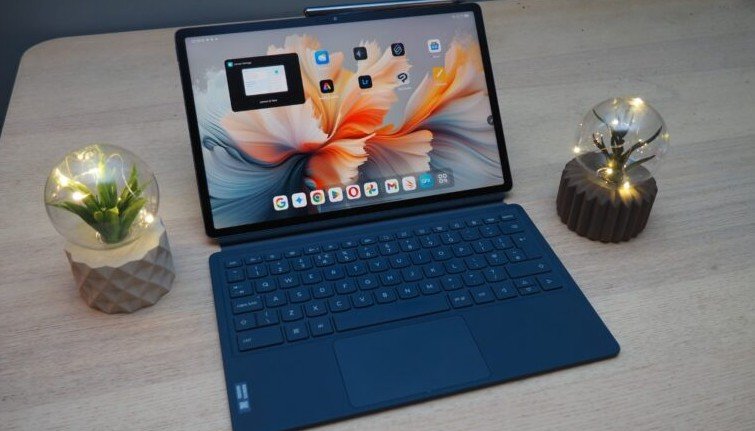
A magnetic keyboard dock
-
A smart pen
-
A magnetic kickstand attachment
That matters. A lot.
Other brands often sell these pieces separately, pushing the real cost far higher than the sticker price. Lenovo puts them right in the box, signaling what this tablet is meant to be: flexible.
The keyboard isn’t a replacement for a laptop, but it’s comfortable enough for emails, notes, and light writing. The keys have decent travel, and the trackpad works well with Android’s steadily improving multitasking.
The pen is responsive and accurate, especially for sketching, marking up PDFs, or jotting down quick thoughts. Latency stays low, and palm rejection behaves as expected.
Together, these extras turn the Yoga Tab into a proper work-and-play device, not just a screen you tap.
A display built for everyday enjoyment
Lenovo doesn’t chase absurd specs here, and that’s a good thing.
The display is sharp, bright, and easy on the eyes. Text looks clean. Colors pop without going cartoonish. Watching movies or shows feels natural, especially when paired with the kickstand.
This is a tablet you’ll actually want to use for streaming, reading, browsing, and video calls.
The aspect ratio works well for both portrait and landscape use, which sounds minor until you switch between reading articles, replying to messages, and watching YouTube. Everything fits comfortably.
Speakers deserve a quick mention too. They’re loud, clear, and well-tuned for a tablet. Dialogue stays crisp, and there’s enough body to make music and shows enjoyable without reaching for headphones.
Performance that keeps things smooth
Under the hood, the Yoga Tab delivers solid, dependable performance.
Apps open quickly. Multitasking works as intended. Scrolling stays smooth. You don’t feel the system fighting you.
This isn’t a device aimed at hardcore gaming or heavy video editing. It’s built for real-world use. Emails, documents, browsing, drawing, streaming, and light productivity all run without friction.
Android itself feels more at home on larger screens now, and Lenovo has wisely avoided cluttering the experience with excessive software tweaks.
You get a clean interface with just enough customization to be helpful, not distracting.
Battery life also holds up well. A full day of mixed use isn’t an issue, and lighter days stretch comfortably beyond that. Standby drain stays low, which matters more than people admit.
Android tablets finally growing up
Part of why this tablet works so well isn’t just hardware. It’s timing.
Android has matured. App scaling is better. Split-screen use makes sense. Keyboard and pen support feel natural rather than forced.
Lenovo takes advantage of that maturity instead of fighting it.
The Yoga Tab doesn’t try to turn Android into a desktop OS. It leans into what Android does best: flexibility, touch-first interaction, and quick task switching.
That makes this tablet feel relaxed to use. There’s no pressure to treat it like a laptop replacement, even though it can handle some of those tasks.
Where it falls short, honestly
No device gets everything right.
The Yoga Tab won’t satisfy users looking for top-tier performance or bleeding-edge features. If you want the fastest processor, the highest refresh rate, or a premium brand badge, you’ll find alternatives, usually at a higher price.
Camera quality is fine, not special. Video calls look clear enough, but this isn’t a photography tool, and it doesn’t pretend to be.
And while the keyboard is good, it’s still a tablet keyboard. Long writing sessions may push you back toward a traditional laptop.
These aren’t deal-breakers. They’re trade-offs.
Value that’s hard to ignore
At $549.99, the Yoga Tab lands in a sweet spot.
You’re getting the tablet, keyboard, pen, and stand without playing the add-on pricing game. That alone shifts the value equation.
Compared to higher-priced Android tablets or even entry-level laptops, Lenovo’s offering feels refreshingly straightforward.
You pay once. You get everything you need.
That clarity matters, especially for students, casual creators, or anyone who wants a larger screen without committing to a full computer.
Who this tablet is really for
The Yoga Tab isn’t chasing everyone. It doesn’t need to.
This tablet is ideal if you:
-
Want a larger screen than your phone for daily tasks
-
Enjoy watching shows, reading, or browsing in different positions
-
Take notes, sketch, or annotate documents
-
Need light productivity without laptop bulk
It’s also a great secondary device. Something you grab for the couch, the kitchen, or travel.
And yes, it’s one of the rare Android tablets that feels complete right out of the box.
The bigger picture
Lenovo has quietly stayed committed to Android tablets while many competitors stepped back. That consistency shows in the Yoga Tab.
It’s confident without being loud. Practical without being boring.
In a market full of extremes, this tablet lands comfortably in the middle, and that’s exactly why it works.
You don’t buy the Yoga Tab to show off specs. You buy it because it fits into your life easily, and once it’s there, it earns its place.